

Snowflake is one of the best data warehouses available. But buying it doesn't give you a data platform. A working platform also requires an engineering environment where your team can develop consistently, orchestration to run and monitor pipelines, CI/CD to enforce quality before anything reaches production, and ways of working that make the whole thing maintainable as your team grows. Most Snowflake implementations deliver the warehouse. The platform layer around it, and the practices underneath it, are usually left for your team to figure out after the SI rolls off. That gap is where most implementations quietly fail.
Buying Snowflake gives you a warehouse. A working data platform requires an engineering environment, orchestration, CI/CD, and ways of working that don't come with the warehouse contract.
A data warehouse stores and processes data. That's what it was designed to do, and Snowflake does it exceptionally well.
A data platform does something different. It's the environment where your team develops, tests, deploys, and monitors data products. It includes the tools, the conventions, and the ways of working that determine whether your data is trustworthy, usable, and maintainable at scale.
The distinction matters because most implementations are scoped around the warehouse. The platform layer gets treated as something that will sort itself out later. It rarely does.
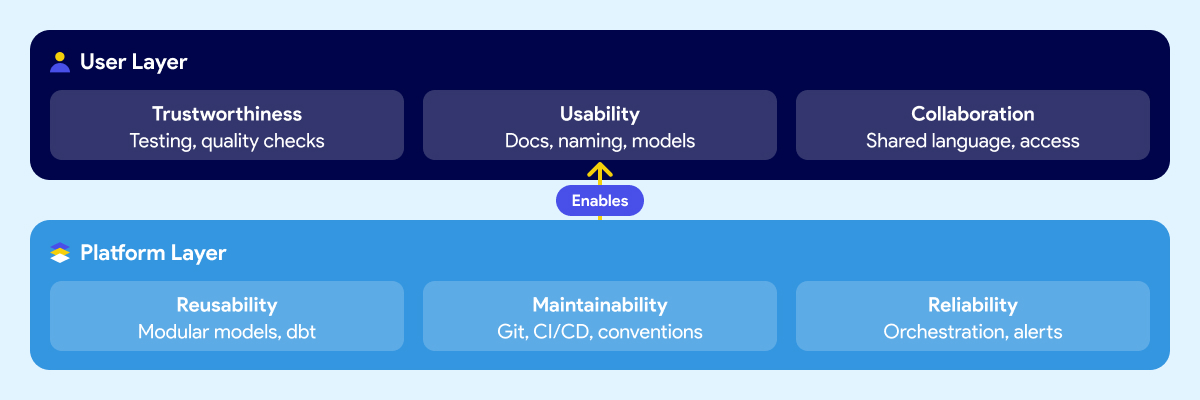
Think about it in two layers.
The first is what your users experience: whether they trust the data, whether they can find and understand it, and whether business and technical teams can communicate around it. This includes trustworthiness, usability, collaboration.
The second is what makes those outcomes possible at the platform level: whether data products can be reused without rebuilding from scratch, whether the system is maintainable when people leave or the team grows, and whether pipelines are reliable enough that failures get caught early instead of surfacing in a meeting. These include reusability, maintainability, reliability.
Most Snowflake implementations deliver storage and compute. The six outcomes above are what your business expected the platform to produce. They require deliberate work that sits outside the warehouse contract.
Snowflake is excellent at what it does. Fast queries, elastic scaling, clean separation of storage and compute, a strong security model. If your previous warehouse was on-prem or running on aging infrastructure, the difference is real and immediate.
The problem isn't Snowflake. The expectation that the warehouse is the platform is.
Snowflake handles storage, compute, and access control. It doesn't give your team a development environment. It doesn't orchestrate your pipelines or tell you when one failed and why. It doesn't enforce naming conventions, testing standards, or deployment rules. It doesn't document your data models or make them understandable to a business analyst who didn't build them. It doesn't define how your team reviews code, manages branches, or promotes changes from development to production.
Those things aren't gaps in Snowflake's product. They were never Snowflake's job.
But when leaders evaluate a warehouse and sign a contract, the scope of what they're buying rarely gets articulated clearly. The demos show fast queries and a clean UI. The pitch covers performance benchmarks and cost savings versus the legacy system. Nobody walks through the engineering environment your team will need to build on top of it, because that's not what the vendor is selling.
So teams buy a best-in-class warehouse and then spend the next six months discovering everything else they need. Some figure it out. Some don't. And most take a long time to get there.
There are three common paths to a Snowflake implementation. Each one has real strengths. Each one has a predictable blind spot that leads to the same outcome: a warehouse that works, but fails to deliver the expected results.
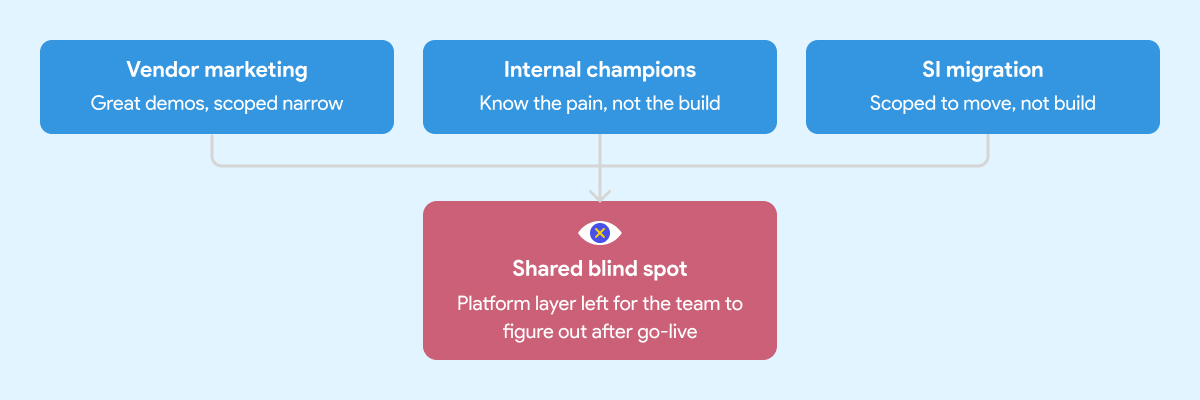
Snowflake's marketing is good. That's not a criticism, it's an observation. The positioning is clear, the case studies are compelling, and the product genuinely delivers on the core promise.
What the marketing doesn't cover is everything that sits around the warehouse. That's not Snowflake's job. Their job is to sell Snowflake. The implicit message, though, is that the hard problem is the warehouse. Once that's solved, everything else follows.
It doesn't. Leaders who build their implementation strategy around the vendor pitch tend to underscope the project from the start. The warehouse gets stood up on time and on budget. The data engineering environment, the orchestration layer, the governance foundation, those get deferred. Sometimes indefinitely.
Every organization has at least one person who comes back from a Snowflake conference ready to modernize everything. That enthusiasm is valuable. It's also frequently mis-channeled.
Internal champions know the business problem well. They've seen the pain. What they often don't have is deep experience building and operating a production data platform from scratch. They know what good outcomes look like. They haven't necessarily seen what a well-built foundation looks like underneath those outcomes.
So the implementation gets shaped around what they know: the warehouse, the transformation tool, maybe a basic orchestration setup. The harder questions around developer environments, CI/CD, testing standards, secrets management, and deployment conventions don't get asked because nobody in the room has been burned by skipping them before.
A migration is not a platform implementation. The SI's job is to get your data into Snowflake. Whether the environment your team inherits is maintainable and built on sound engineering practices is usually outside the engagement scope.
System integrators are good at migrations. Moving data from point A to point B, replicating existing logic in a new tool, hitting a go-live date. That's what most of them are scoped and incentivized to deliver.
It's not that SIs cut corners. It's that "build a production-grade data engineering platform with sustainable ways of working" wasn't in the statement of work.
What gets handed off is a warehouse with some tables, some transformation logic, and documentation that will be out of date within a month. The team that inherits it then spends the next year figuring out how to operate it at scale.
If you're evaluating implementation partners, here's what to look for before you sign.
When the implementation is scoped around the warehouse and the migration, a predictable set of things gets deferred. Not because anyone decided they didn't matter, but because they weren't on the project plan.
Here's what that looks like in practice six to twelve months later.
Snowflake costs start climbing. Without well-structured data models, query optimization standards, and sensible clustering strategies, warehouses burn credits fast. Teams that skipped the engineering foundation often spend the first year optimizing for cost rather than delivering new capabilities. The savings from migrating off the legacy system quietly get absorbed by an inefficient Snowflake setup.
Business users don't trust the data. When there are no testing standards, no documentation conventions, and no consistent naming across models, analysts spend more time validating numbers than using them. The platform gets a reputation for being unreliable. People go back to Excel because nobody built the layer that makes data understandable and trustworthy.
The team can't move fast. Without CI/CD pipelines, code reviews, and deployment guardrails, every change is a risk. Engineers slow down because they're afraid of breaking something. Onboarding a new team member takes weeks because the knowledge lives in people's heads, not in the system.
Pipelines break in ways nobody sees coming. Without orchestration that handles dependencies, retries, and failure alerts, pipeline failures surface downstream. A business user notices the numbers are wrong before the data team does. That erodes trust fast and is hard to rebuild.
The foundation debt compounds. Every week that passes without fixing the underlying structure makes it harder to fix. New models get built on top of a shaky base. Refactoring becomes expensive. The team that was supposed to be delivering new data products spends its time maintaining what already exists.
This is the real cost of the quick win approach. Six months of fast progress followed by years of slow, careful, expensive work to undo the shortcuts.
We've documented what that looks like in practice here.
Most implementation conversations focus on the tool stack. Which warehouse, which transformation framework, which orchestrator. Those are real decisions and they matter.
But the teams that deliver reliable data products consistently aren't just using the right tools. They're using them the same way across every engineer on the team.
That's the ways of working problem. And it's the part nobody puts in the project plan.
A team with Snowflake and dbt but no agreed branching strategy, no code review process, no testing standards, and no deployment conventions is still fragile. One engineer builds models one way. Another builds them differently. A third inherits both and must figure out which approach is "correct" before they can extend anything. The system never enforced a consistent approach.
The same applies to orchestration. Airflow is powerful. An Airflow environment where every engineer writes DAGs differently, secrets are managed inconsistently, and there's no standard for how pipeline failures get handled is not an asset. It's a maintenance problem waiting to get worse.
Good data engineering is a thought-out combination of tools and conventions that work together. The conventions are what make the tools scale beyond the person who set them up.
This is why the two-layer framework matters in practice. Trustworthiness, usability, and collaboration aren't outcomes you get from buying the right tools. They're outcomes you get when the platform layer underneath, the reusability, maintainability, and reliability, is built deliberately. With both the right tooling and the right ways of working enforced by the system itself, not by people remembering to follow a document.
The teams that figure this out usually do it the hard way. They run into the problems first, then back into the conventions that would have prevented them. That process can take years and a lot of frustration. Getting the ways of working right from the start compresses that timeline significantly.
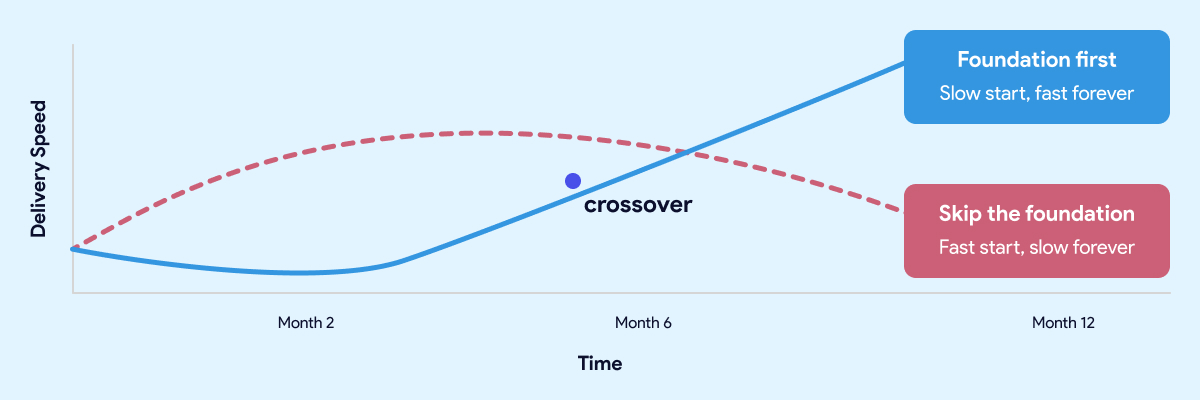
The teams that move fastest twelve months in are almost always the ones who slowed down at the start.
The most common objection to investing in the foundation is time. Leaders have stakeholders who want results. Boards want dashboards. The business wants answers. Spending eight weeks building an engineering environment and establishing conventions feels like the opposite of moving fast.
That instinct is understandable. It's also wrong.
The teams that move fastest twelve months in are almost always the ones who slowed down at the start. Not forever. For a few weeks. Long enough to get the development environment right, establish the conventions, wire up CI/CD, and make sure the orchestration layer is solid before anyone builds on top of it.
The teams that skipped that work aren't moving fast. They're managing debt. Every new model gets built carefully because nobody is sure what it might break. Every pipeline change requires manual testing because the automated checks were never put in place. Every new hire takes weeks to get productive because the knowledge lives in people, not in the system.
A quick start that skips the foundation isn't free. It's a loan at a high interest rate. The payments start small and get larger every month.
The same logic applies here. A quick start that skips the foundation isn't free. It's a loan at a high interest rate. The payments start small and get larger every month.
Getting the foundation right upfront doesn't mean months of invisible infrastructure work before anyone sees results. Done well, it takes weeks, not quarters. And what you get on the other side is a team that ships twice a week without being afraid of what they might break, data that business users trust, and a platform that gets easier to extend as it grows rather than harder.
That's not slow. That's the fast path.
Before you sign with anyone, there's a specific set of questions worth asking your SI or platform vendor. We covered them in detail here.
Most teams face a choice at the start of a data platform project. Build the foundation properly and accept that it takes time. Or skip it and move fast now, knowing you'll pay for it later.
Datacoves is built around the idea that you shouldn't have to make that trade-off.
It's an enterprise data engineering platform that runs inside your private cloud and comes with the foundation pre-built. Managed dbt and Airflow, a VS Code development environment your engineers can open on day one, CI/CD pipelines that enforce quality before anything reaches production, and an architecture built on best practices that your team inherits rather than invents.
The conventions, the guardrails, the deployment workflows, the secrets management, the testing framework. None of that gets figured out after the fact. It's already there.
That's what compresses the timeline. Not shortcuts. Not skipping steps. The foundation work is done, and your team starts from a position that most organizations spend a year trying to reach on their own.
The result is a team that ships consistently from early on, data that business users trust because quality is enforced by the system rather than by people remembering to check, and a platform that gets easier to extend as it grows.
Guitar Center onboarded in days. Johnson and Johnson described it as a framework accelerator. Those outcomes aren't the result of moving fast and fixing problems later. They're the result of starting with a foundation that didn't need to be fixed.
Snowflake is a great warehouse. The teams that get the most out of it aren't the ones who bought it and figured out the rest later. They're the ones who treated the platform layer as part of the project from the start. The tool doesn't build the platform. That part is still your decision to make.
A lean analytics stack built with dlt, DuckDB, DuckLake, and dbt delivers fast insights without the cost or complexity of a traditional cloud data warehouse. For teams prioritizing speed, simplicity, and control, this architecture provides a practical path from raw data to production-ready analytics.
In practice, teams run this stack using Datacoves to standardize environments, manage workflows, and apply production guardrails without adding operational overhead.
A lean analytics stack built with dlt, DuckDB, DuckLake, and dbt delivers fast, production-ready insights without the cost or complexity of a traditional cloud data warehouse.
A lean analytics stack works when each tool has a clear responsibility. In this architecture, ingestion, storage, and transformation are intentionally separated so the system stays fast, simple, and flexible.
Together, these tools form a modern lakehouse-style stack without the operational cost of a traditional cloud data warehouse.
Running DuckDB locally is easy. Running it consistently across machines, environments, and teams is not. This is where MotherDuck matters.
MotherDuck provides a managed control plane for DuckDB and DuckLake, handling authentication, metadata coordination, and cloud-backed storage without changing how DuckDB works. You still query DuckDB. You just stop worrying about where it runs.
To get started:
MOTHERDUCK_TOKEN).This single token is used by dlt, DuckDB, and dbt to authenticate securely with MotherDuck. No additional credentials or service accounts are required.
At this point, you have:
That consistency is what makes the rest of the stack reliable.
In a lean data stack, ingestion should be reliable, repeatable, and boring. That is exactly what dlt is designed to do.
dlt loads raw data into DuckDB with strong defaults for schema handling, incremental loads, and metadata tracking. It removes the need for custom ingestion frameworks while remaining flexible enough for real-world data sources.
In this example, dlt ingests a CSV file and loads it into a DuckDB database hosted in MotherDuck. The same pattern works for APIs, databases, and file-based sources.
To keep dependencies lightweight and avoid manual environment setup, we use uv to run the ingestion script with inline dependencies.
pip install uv
touch us_populations.py
chmod +x us_populations.py
The script below uses dlt’s MotherDuck destination. Authentication is handled through the MOTHERDUCK_TOKEN environment variable, and data is written to a raw schema in DuckDB.
#!/usr/bin/env -S uv run
# /// script
# dependencies = [
#   "dlt[motherduck]==1.16.0",
#   "psutil",
#   "pandas",
#   "duckdb==1.3.0"
# ]
# ///

"""Loads a CSV file to MotherDuck"""
import dlt
import pandas as pd
from utils.datacoves_utils import pipelines_dir

@dlt.resource(write_disposition="replace")
def us_population():
    url = "https://raw.githubusercontent.com/dataprofessor/dashboard-v3/master/data/us-population-2010-2019.csv"
    df = pd.read_csv(url)
    yield df

@dlt.source
def us_population_source():
    return [us_population()]

if __name__ == "__main__":
    # Configure MotherDuck destination with explicit credentials
    motherduck_destination = dlt.destinations.motherduck(
        destination_name="motherduck",
        credentials={
            "database": "raw",
            "motherduck_token": dlt.secrets.get("MOTHERDUCK_TOKEN")
        }
    )

    pipeline = dlt.pipeline(
        progress = "log",
        pipeline_name = "us_population_data",
        destination = motherduck_destination,
        pipelines_dir = pipelines_dir,

        # dataset_name is the target schema name in the "raw" database
        dataset_name="us_population"
    )

    load_info = pipeline.run([
        us_population_source()
    ])

    print(load_info)
Running the script loads the data into DuckDB:
./us_populations.pyAt this point, raw data is available in DuckDB and ready for transformation. Ingestion is fully automated, reproducible, and versionable, without introducing a separate ingestion platform.
Once raw data is loaded into DuckDB, transformations should follow the same disciplined workflow teams already use elsewhere. This is where dbt fits naturally.
dbt provides version-controlled models, testing, documentation, and repeatable builds. The difference in this stack is not how dbt works, but where tables are materialized.
By enabling DuckLake, dbt materializes tables as Parquet files with centralized metadata instead of opaque DuckDB-only files. This turns DuckDB into a true lakehouse engine while keeping the developer experience unchanged.
To get started, install dbt and the DuckDB adapter:
pip install dbt-core==1.10.17
pip install dbt-duckdb==1.10.0
dbt init
Next, configure your dbt profile to target DuckLake through MotherDuck:
default:
  outputs:
    dev:
      type: duckdb
      # This requires the environment var MOTHERDUCK_TOKEN to be set
      path: 'md:datacoves_ducklake'
      threads: 4
      schema: dev  # this will be the prefix used in the duckdb schema
      is_ducklake: true

  target: dev
This configuration does a few important things:
MOTHERDUCK_TOKEN environment variableWith this in place, dbt models behave exactly as expected. Models materialized as tables are stored in DuckLake, while views and ephemeral models remain lightweight and fast.
From here, teams can:
This is the key advantage of the stack: modern analytics engineering practices, without the overhead of a traditional warehouse.
This lean stack is not trying to replace every enterprise data warehouse. It is designed for teams that value speed, simplicity, and cost control over heavyweight infrastructure.
This approach works especially well when:
The trade-offs are real and intentional. DuckDB and DuckLake excel at analytical workloads and developer productivity, but they are not designed for high-concurrency BI at massive scale. Teams with hundreds of dashboards and thousands of daily users may still need a traditional warehouse.
Where this stack shines is time to value. You can move from raw data to trusted analytics quickly, with minimal infrastructure, and without locking yourself into a platform that is expensive to unwind later.
In practice, many teams use this architecture as:
When paired with Datacoves, teams get the operational guardrails this stack needs to run reliably. Datacoves standardizes environments, integrates orchestration and CI/CD, and applies best practices so the simplicity of the stack does not turn into fragility over time.
Teams often run this stack with Datacoves to standardize environments, apply production guardrails, and avoid the operational drag of DIY platform management.
If you want to see this stack running end to end, watch the Datacoves + MotherDuck webinar. It walks through ingestion with dlt, transformations with dbt and DuckLake, and how teams operationalize the workflow with orchestration and governance.
The session also covers:
The Databricks AI Summit 2025 revealed a major shift toward simpler, AI-ready, and governed data platforms. From no-code analytics to serverless OLTP and agentic workflows, the announcements show Databricks is building for a unified future.
In this post, we break down the six most impactful features announced at the summit and what they mean for the future of data teams.
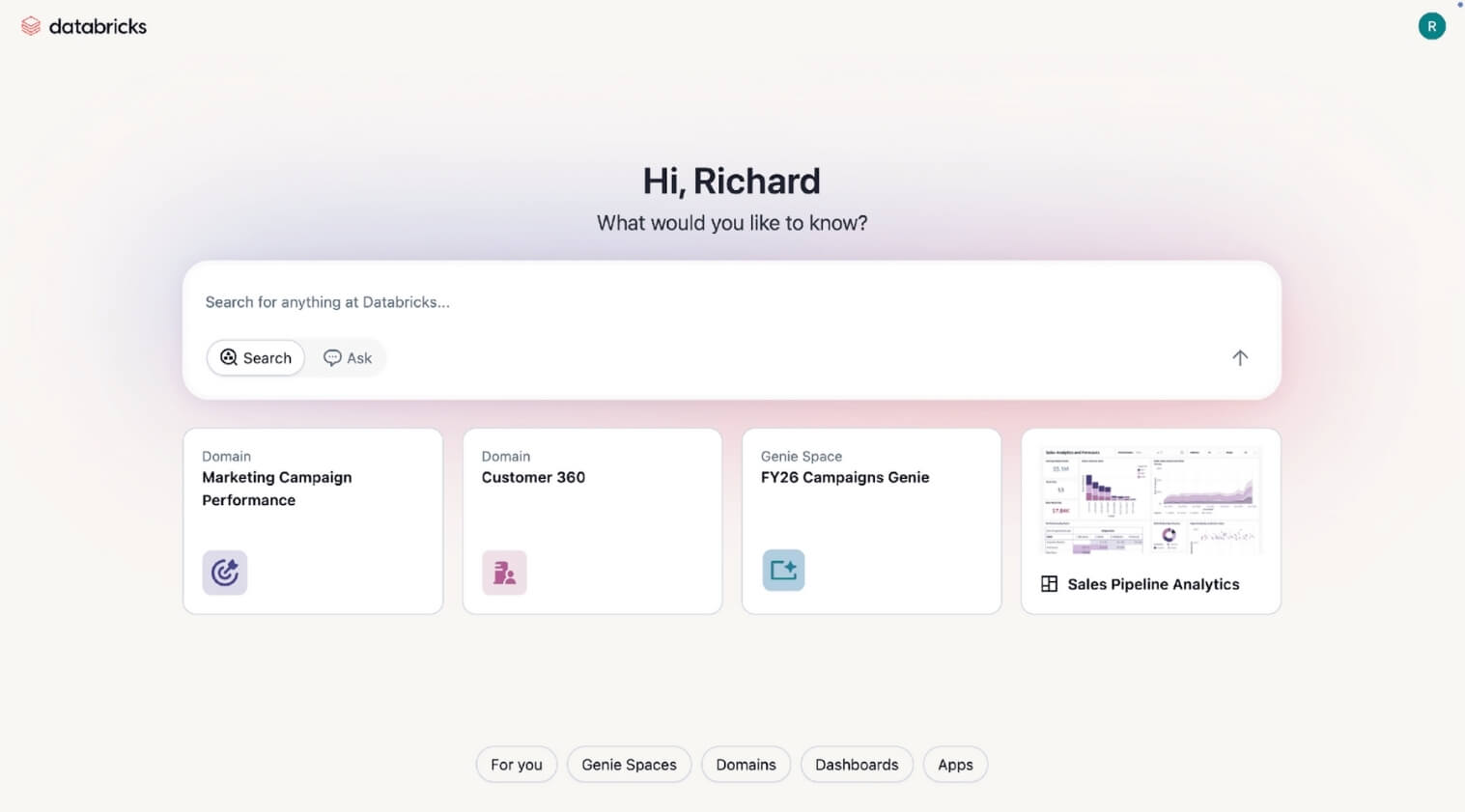
Databricks One (currently in private preview) introduces a no-code analytics platform aimed at democratizing access to insights across the organization. Powered by Genie, users can now interact with business data through natural language Q&A, no SQL or dashboards required. By lowering the barrier to entry, tools like Genie can drive better, faster decision-making across all functions.
Datacoves Take: As with any AI we have used to date, having a solid foundation is key. AI can not solve ambiguous metrics and a lack of knowledge. As we have mentioned, there are some dangers in trusting AI, and these caveats still exist.
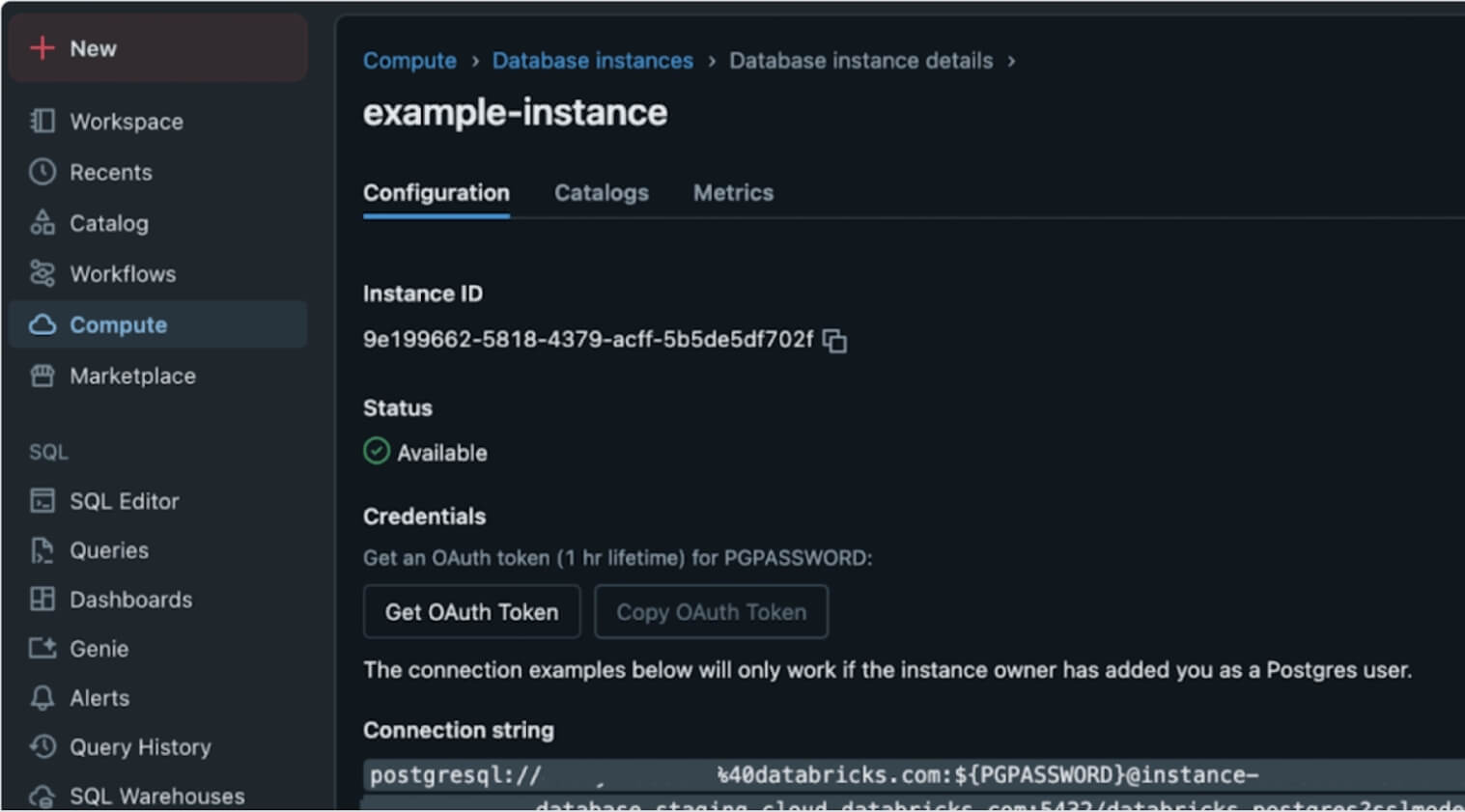
In a bold move, Databricks launched Lakebase, a Postgres-compatible, serverless OLTP database natively integrated into the lakehouse. Built atop the foundations laid by the NeonDB acquisition, Lakebase reimagines transactional workloads within the unified lakehouse architecture. This is more than just a database release; it’s a structural shift that brings transactional (OLTP) and analytical (OLAP) workloads together, unlocking powerful agentic and AI use cases without architectural sprawl.
Datacoves Take: We see both Databricks and Snowflake integrating Postgres into their offering. Ducklake is also demonstrating a simpler future for Iceberg catalogs. Postgres has a strong future ahead, and the unification of OLAP and OLTP seems certain.
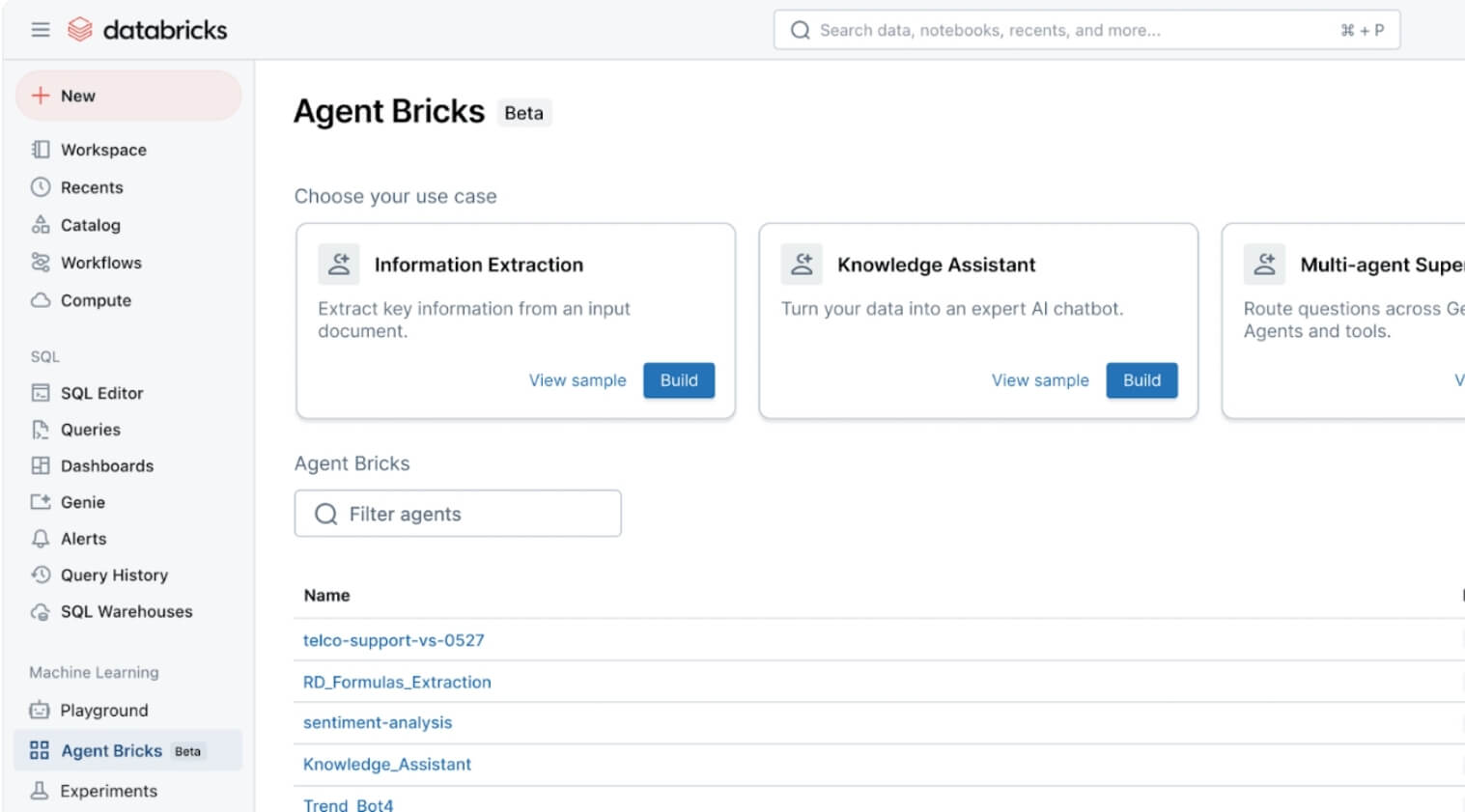
With the introduction of Agent Bricks, Databricks is making it easier to build, evaluate, and operationalize agents for AI-driven workflows. What sets this apart is the use of built-in “judges” - LLMs that automatically assess agent quality and performance. This moves agents from hackathon demos into the enterprise spotlight, giving teams a foundation to develop production-grade AI assistants grounded in company data and governance frameworks.
Datacoves Take: This looks interesting, and the key here still lies in having a strong data foundation with good processes. Reproducibility is also key. Testing and proving that the right actions are performed will be important for any organization implementing this feature.
Databricks introduced Databricks Apps, allowing developers to build custom user interfaces that automatically respect Unity Catalog permissions and metadata. A standout demo showed glossary terms appearing inline inside Chrome, giving business users governed definitions directly in the tools they use every day. This bridges the gap between data consumers and governed metadata, making governance feel less like overhead and more like embedded intelligence.
Datacoves Take: Metadata and catalogs are important for AI, so we see both Databricks and Snowflake investing in this area. As with any of these changes, technology is not the only change needed in the organization. Change management is also important. Without proper stewardship, ownership, and review processes, apps can’t provide the experience promised.
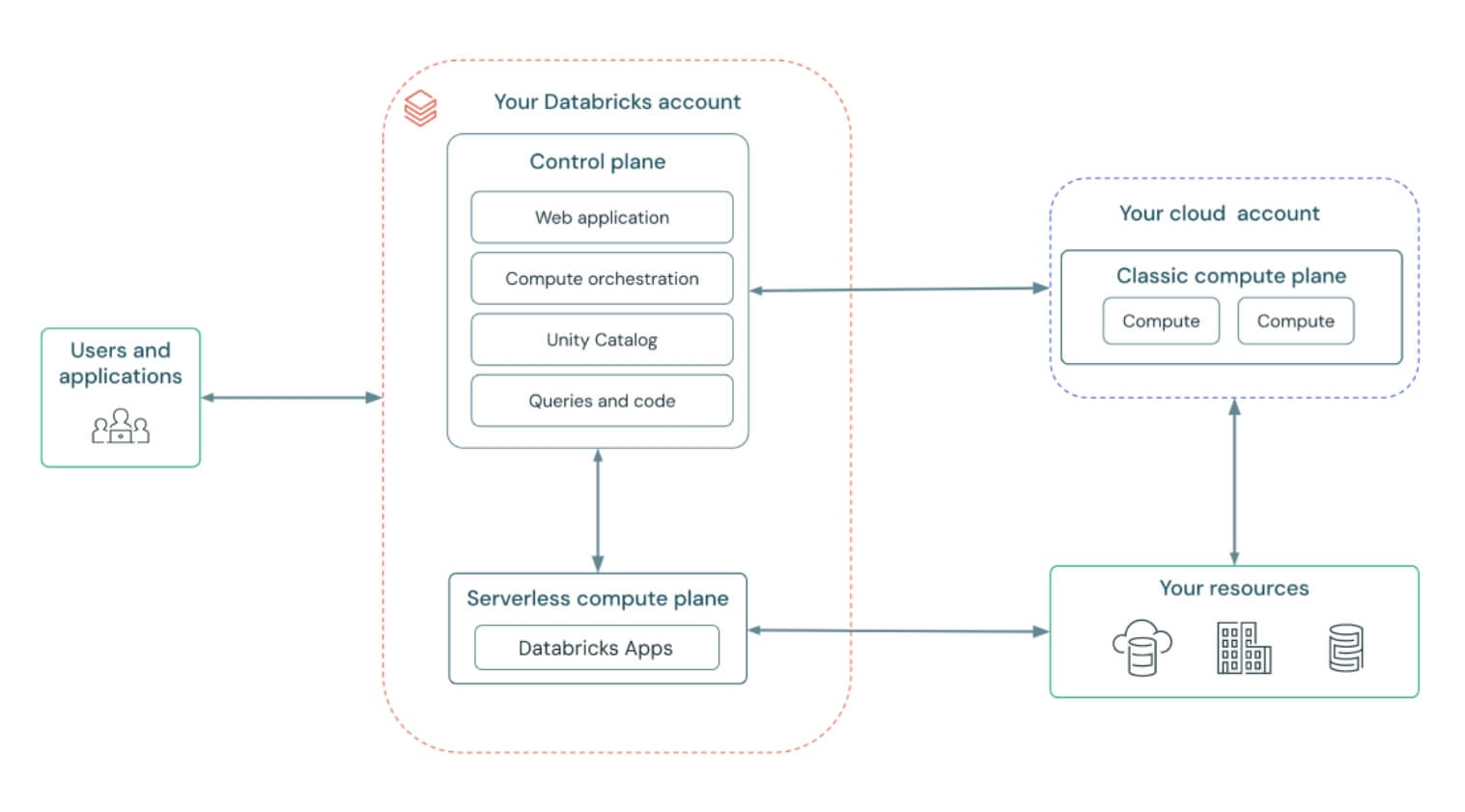
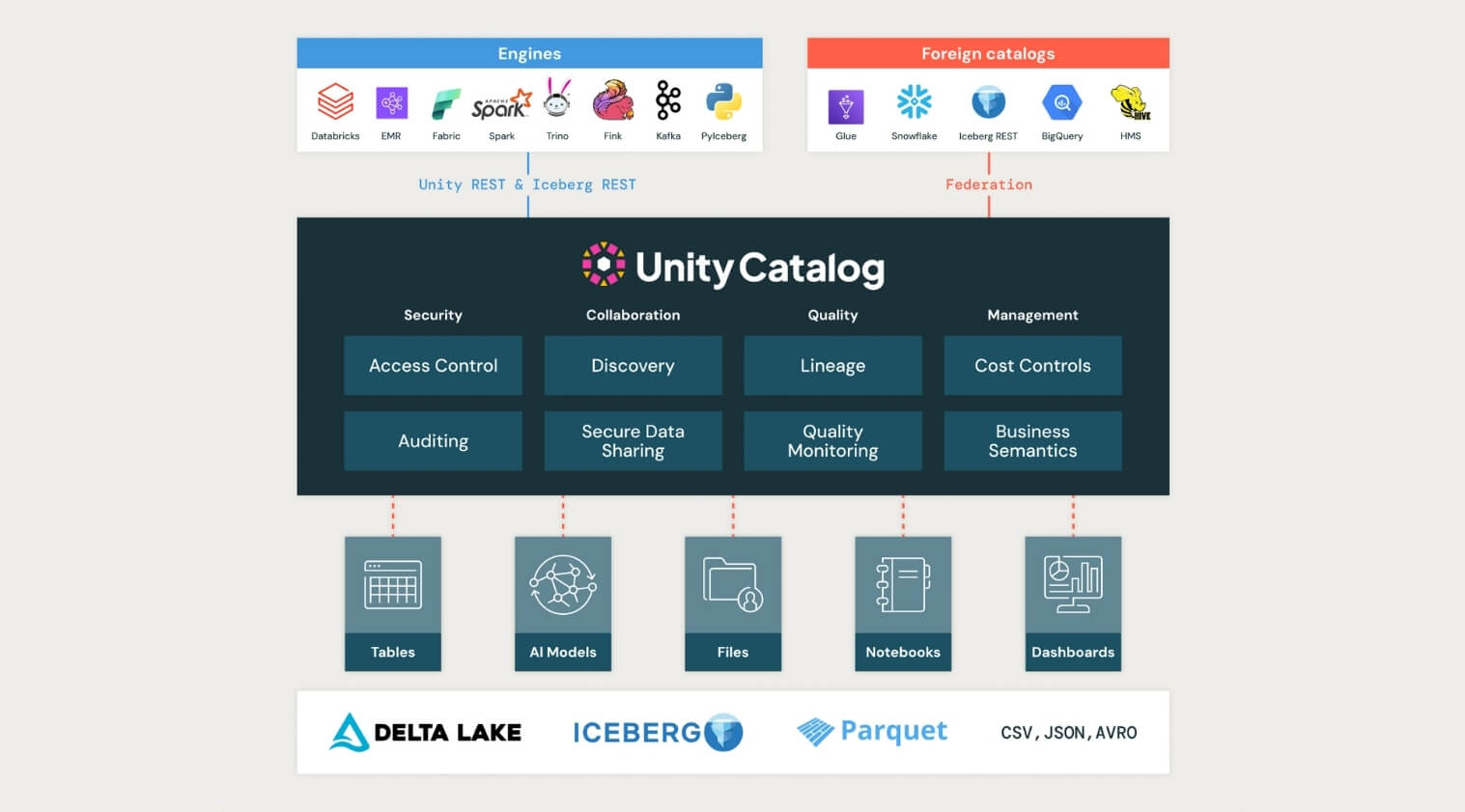
Unity Catalog took a major step forward at the Databricks AI Summit 2025, now supporting managed Apache Iceberg tables, cross-engine interoperability, and introducing Unity Catalog Metrics to define and track business logic across the organization.
This kind of standardization is critical for teams navigating increasingly complex data landscapes. By supporting both Iceberg and Delta formats, enabling two-way sync, and contributing to the open-source ecosystem, Unity Catalog is positioning itself as the true backbone for open, interoperable governance.
Datacoves Take: The Iceberg data format has the momentum behind it; now it is up to the platforms to enable true interoperability. Organizations are expecting a future where a table can be written and read from any platform. DuckLake is also getting in the game, simplifying how metadata is managed, and multi-table transactions are enabled. It will be interesting to see if Unity and Polaris take some of the DuckLake learnings and integrate them in the next few years.
In a community-building move, Databricks introduced a forever-free edition of the platform and committed $100 million toward AI and data training. This massive investment creates a pipeline of talent ready to use and govern AI responsibly. For organizations thinking long-term, this is a wake-up call: governance, security, and education need to scale with AI adoption, not follow behind.
Datacoves Take: This feels like a good way to get more people to try Databricks without a big commitment. Hopefully, competitors take note and do the same. This will benefit the entire data community.
Read the full post from Databricks here:
https://www.databricks.com/blog/summary-dais-2025-announcements-through-lens-games
With tools like Databricks One and Genie enabling no-code, natural language analytics, data leaders must prioritize making insights accessible beyond technical teams to drive faster, data-informed decisions at every level.
Lakebase’s integration of transactional and analytical workloads signals a move toward simpler, more efficient data stacks. Leaders should rethink their architectures to reduce complexity and support real-time, AI-driven applications.
Agent Bricks and built-in AI judges highlight the shift from experimental AI agents to production-ready, measurable workflows. Data leaders need to invest in frameworks and governance to safely scale AI agents across use cases.
Unity Catalog’s expanded support for Iceberg, Delta, and cross-engine interoperability emphasizes the need for unified governance frameworks that handle diverse data formats while maintaining business logic and compliance.
The launch of a free tier and $100M training fund underscores the growing demand for skilled data and AI practitioners. Data leaders should plan for talent development and operational readiness to fully leverage evolving platforms.
The Databricks AI Summit 2025 signals a fundamental shift: from scattered tools and isolated workflows to unified, governed, and AI-native platforms. It’s not just about building smarter systems; it’s about making those systems accessible, efficient, and scalable for the entire organization.
While these innovations are promising, putting them into practice takes more than vision; it requires infrastructure that balances speed, control, and usability.
That’s where Datacoves comes in.
Our platform accelerates the adoption of modern tools like dbt, Airflow, and emerging AI workflows, without the overhead of managing complex environments. We help teams operationalize best practices from day one, reducing total cost of ownership while enabling faster delivery, tighter governance, and AI readiness at scale. Datacoves supports Databricks, Snowflake, BigQuery, and any data platform with a dbt adapter. We believe in an open and interoperable feature where tools are integrated without increasing vendor lock-in. Talk to us to find out more.
Want to learn more? Book a demo with Datacoves.

It is clear that Snowflake is positioning itself as an all-in-one platform—from data ingestion, to transformation, to AI. The announcements covered a wide range of topics, with AI mentioned over 60 times during the 2-hour keynote. While time will tell how much value organizations get from these features, one thing remains clear: a solid foundation and strong governance are essential to deliver on the promise of AI.
Conversational AI via natural language at ai.snowflake.com, powered by Anthropic/OpenAI LLMs and Cortex Agents, unifying insights across structured and unstructured data. Access is available through your account representative.
Datacoves Take: Companies with strong governance—including proper data modeling, clear documentation, and high data quality—will benefit most from this feature. AI cannot solve foundational issues, and organizations that skip governance will struggle to realize its full potential.
An AI companion for automating ML workflows—covering data prep, feature engineering, model training, and more.
Datacoves Take: This could be a valuable assistant for data scientists, augmenting rather than replacing their skills. As always, we'll be better able to assess its value once it's generally available.
Enables multimodal AI processing (like images, documents) within SQL syntax, plus enhanced Document AI and Cortex Search.
Datacoves Take: The potential here is exciting, especially for teams working with unstructured data. But given historical challenges with Document AI, we’ll be watching closely to see how this performs in real-world use cases.
No-code monitoring tools for generative AI apps, supporting LLMs from OpenAI (via Azure), Anthropic, Meta, Mistral, and others.
Datacoves Take: Observability and security are critical for LLM-based apps. We’re concerned that the current rush to AI could lead to technical debt and security risks. Organizations must establish monitoring and mitigation strategies now, before issues arise 12–18 months down the line.
Managed, extensible multimodal data ingestion service built on Apache NiFi with hundreds of connectors, simplifying ETL and change-data capture.
Datacoves Take: While this simplifies ingestion, GUI tools often hinder CI/CD and code reviews. We prefer code-first tools like DLT that align with modern software development practices. Note: Openflow requires additional AWS setup beyond Snowflake configuration.
Native dbt development, execution, monitoring with Git integration and AI-assisted code in Snowsight Workspaces.
Datacoves Take: While this makes dbt more accessible for newcomers, it’s not a full replacement for the flexibility and power of VS Code. Our customers rely on VS Code not just for dbt, but also for Python ingestion development, managing security as code, orchestration pipelines, and more. Datacoves provides an integrated environment that supports all of this—and more. See this walkthrough for details: https://www.youtube.com/watch?v=w7C7OkmYPFs
Read/write Iceberg tables via Open Catalog, dynamic pipelines, VARIANT support, and Merge-on-Read functionality.
Datacoves Take: Interoperability is key. Many of our customers use both Snowflake and Databricks, and Iceberg helps reduce vendor lock-in. Snowflake’s support for Iceberg with advanced features like VARIANT is a big step forward for the ecosystem.
Custom Git URLs, Terraform provider now GA, and Python 3.9 support in Snowflake Notebooks.
Datacoves Take: Python 3.9 is a good start, but we’d like to see support for newer versions. With PyPi integration, teams must carefully vet packages to manage security risks. Datacoves offers guardrails to help organizations scale Python workflows safely.
Define business metrics inside Snowflake for consistent, AI-friendly semantic modeling.
Datacoves Take: A semantic layer is only as good as the underlying data. Without solid governance, it becomes another failure point. Datacoves helps teams implement the foundations—testing, deployment, ownership—that make semantic layers effective.
Hardware and performance upgrades delivering ~2.1× faster analytics for updates, deletes, merges, and table scans.
Datacoves Take: Performance improvements are always welcome, especially when easy to adopt. Still, test carefully—these upgrades can increase costs, and in some cases existing warehouses may still be the better fit.
Free, automated migration of legacy data warehouses, BI systems, and ETL pipelines with code conversion and validation.
Datacoves Take: These tools are intriguing, but migrating platforms is a chance to rethink your approach—not just lift and shift legacy baggage. Datacoves helps organizations modernize with intention.
Enrich native apps with real-time content from publishers like USA TODAY, AP, Stack Overflow, and CB Insights.
Datacoves Take: Powerful in theory, but only effective if your core data is clean. Before enrichment, organizations must resolve entities and ensure quality.
Internal/external sharing of AI-ready datasets and models, with natural language access across providers.
Datacoves Take: Snowflake’s sharing capabilities are strong, but we see many organizations underutilizing them. Effective sharing starts with trust in the data—and that requires governance and clarity.
Developers can build and monetize Snowflake-native, agent-driven apps using Cortex APIs.
Datacoves Take: Snowflake has long promoted its app marketplace, but adoption has been limited. We’ll be watching to see if the agentic model drives broader use.
Versioning, permissions, app observability, and compliance badging enhancements.
Datacoves Take: We’re glad to see Snowflake adopting more software engineering best practices—versioning, observability, and security are all essential for scale.
Auto-scaling warehouses with intelligent routing for performance optimization without cost increases.
Datacoves Take: This feels like a move toward BigQuery’s simplicity model. We’ll wait to see how it performs at scale. As always, test before relying on this in production.
Enhanced governance across Iceberg tables, relational DBs, dashboards, with natural-language metadata assistance.
Datacoves Take: Governance is core to successful data strategy. While Horizon continues to improve, many teams already use mature catalogs. Datacoves focuses on integrating metadata, ownership, and lineage across tools—not locking you into one ecosystem.
Trust Center updates, new MFA methods, password protections, and account-level security improvements.
Datacoves Take: The move to enforce MFA and support for Passkeys is a great step. Snowflake is making it easier to stay secure—now organizations must implement these features effectively.
Upgrades to Snowflake Trail, telemetry for Openflow, and debug/monitor tools for Snowpark containers and GenAI agents/apps.
Datacoves Take: Observability is critical. Many of our customers build their own monitoring to manage costs and data issues. With these improvements, Snowflake is catching up—and Datacoves complements this with pipeline-level observability, including Airflow and dbt.
Read the full post from Snowflake here:
https://www.snowflake.com/en/blog/announcements-snowflake-summit-2025/

"It looked so easy in the demo…"
— Every data team, six months after adopting a drag-and-drop ETL tool
If you lead a data team, you’ve probably seen the pitch: Slick visuals. Drag-and-drop pipelines. "No code required." Everything sounds great — and you can’t wait to start adding value with data!
At first, it does seem like the perfect solution: non-technical folks can build pipelines, onboarding is fast, and your team ships results quickly.
But our time in the data community has revealed the same pattern over and over: What feels easy and intuitive early on becomes rigid, brittle, and painfully complex later.
Let’s explore why no code ETL tools can lead to serious headaches for your data preparation efforts.
Before jumping into the why and the how, let’s start with the what.
When data is created in its source systems it is never ready to be used for analysis as is. It always needs to be massaged and transformed for downstream teams to gather any insights from the data. That is where ETL comes in. ETL stands for Extract, Transform, Load. This is the process of moving data from multiple sources, reshaping (transforming) it, and loading it into a system where it can be used for analysis.
At its core, ETL is about data preparation:
Without ETL, you’re stuck with messy, fragmented, and unreliable data. Good ETL enables better decisions, faster insights, and more trustworthy reporting. Think of ETL as the foundation that makes dashboards, analytics, Data Science, Machine Learning, GenAI, and lead to data-driven decision-making even possible.
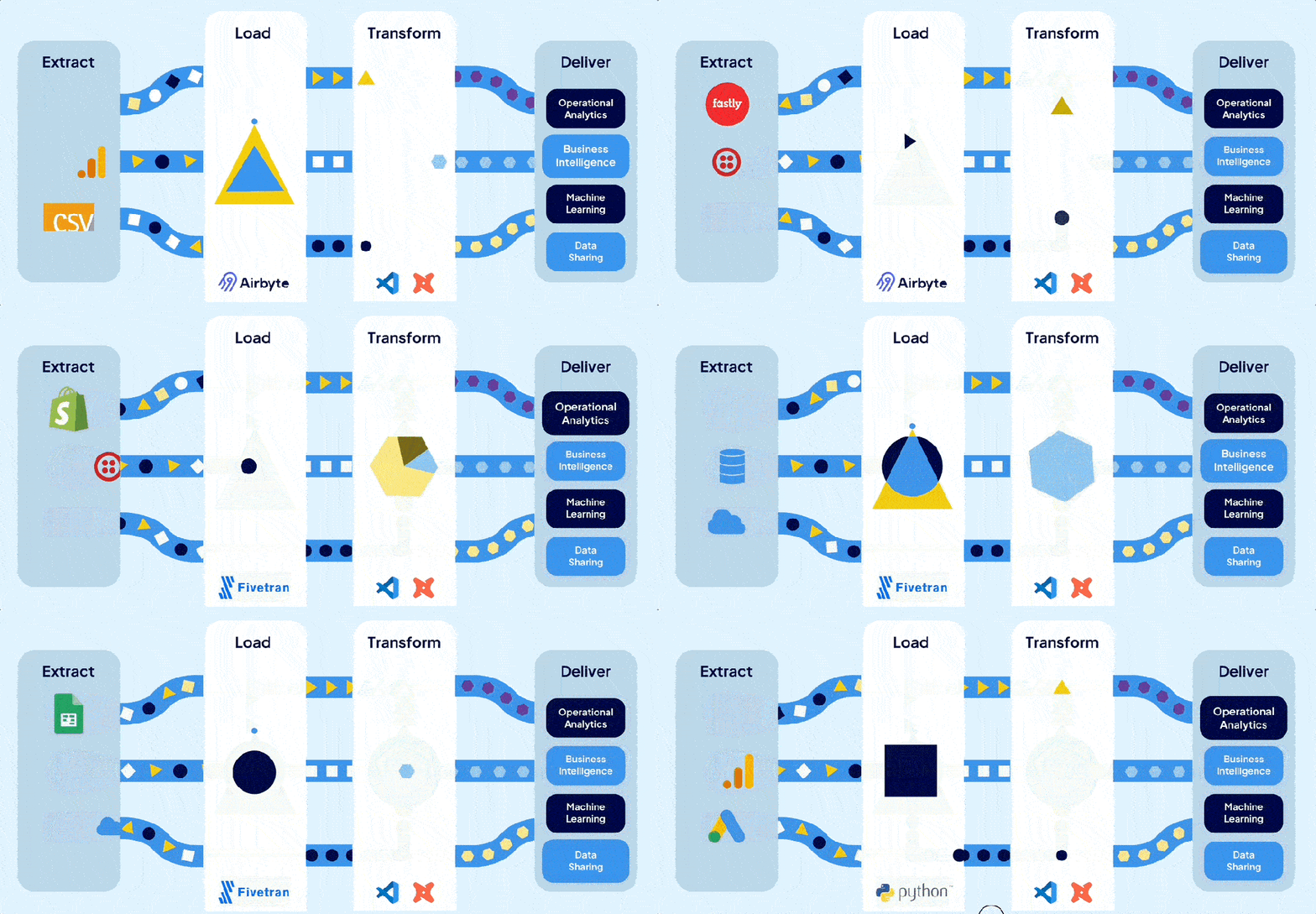
Now the real question is how do we get from raw data to insights? That is where the topic of tooling comes into the picture. While this might be at a very high-level, we categorize tools into two categories: Code-based and no-code/low-code. Let’s look at these categories in a little more detail.
Code-based ETL tools require analysts to write scripts or code to build and manage data pipelines. This is typically done with programming languages like SQL, Python, possibly with specialized frameworks, like dbt, tailored for data workflows.
Instead of clicking through a UI, users define the extraction, transformation, and loading steps directly in code — giving them full control over how data moves, changes, and scales.
Common examples of code-based ETL tooling include dbt (data build tool), SQLMesh, Apache Airflow, and custom-built Python scripts designed to orchestrate complex workflows.
While code-based tools often come with a learning curve, they offer serious advantages:
Most importantly, code-based systems allow teams to treat pipelines like software, applying engineering best practices that make systems more reliable, auditable, and adaptable over time.
Building and maintaining robust ETL pipelines with code requires up-front work to set up CI/CD and developers who understand SQL or Python. Because of this investment in expertise, some teams are tempted to explore whether the grass is greener on the other side with no-code or low-code ETL tools that promise faster results with less engineering complexity. No hard-to-understand code, just drag and drop via nice-looking UIs. This is certainly less intimidating than seeing a SQL query.
As you might have already guessed, no-code ETL tools let users build data pipelines without writing code. Instead, they offer visual interfaces—typically drag-and-drop—that “simplify” the process of designing data workflows.

These tools aim to make data preparation accessible to a broader audience reducing complexity by removing coding. They create the impression that you don't need skilled engineers to build and maintain complex pipelines, allowing users to define transformations through menus, flowcharts, and configuration panels—no technical background required.
However, this perceived simplicity is misleading. No-code platforms often lack essential software engineering practices such as version control, modularization, and comprehensive testing frameworks. This can lead to a buildup of technical debt, making systems harder to maintain and scale over time. As workflows become more complex, the initial ease of use can give way to a tangled web of dependencies and configurations, challenging to untangle without skilled engineering expertise. Additional staff is needed to maintain data quality, manage growing complexity, and prevent the platform from devolving into a disorganized state. Over time, team velocity decreases due to layers of configuration menus.
Popular no-code ETL tools include Matillion, Talend, Azure Data Factory(ADF), Informatica, Talend, and Alteryx. They promise minimal coding while supporting complex ETL operations. However, it's important to recognize that while these tools can accelerate initial development, they may introduce challenges in long-term maintenance and scalability.
To help simplify why best-in-class orginazations typically avoid no-code tools, we've come up with 10 reasons that highlight their limitations.
Most no-code tools claim Git support, but it's often limited to unreadable exports like JSON or XML. This makes collaboration clunky, audits painful, and coordinated development nearly impossible.
Bottom Line: Scaling a data team requires clean, auditable change management — not hidden files and guesswork.
Without true modular design, teams end up recreating the same logic across pipelines. Small changes become massive, tedious updates, introducing risk and wasting your data team’s time. $$$
Bottom Line: When your team duplicates effort, innovation slows down.
When something breaks, tracing the root cause is often confusing and slow. Error messages are vague, logs are buried, and troubleshooting feels like a scavenger hunt. Again, wasting your data team’s time.
Bottom Line: Operational complexity gets hidden behind a "simple" interface — until it’s too late and it starts costing you money.
Most no-code tools make it difficult (or impossible) to automate testing. Without safeguards, small changes can ripple through your pipelines undetected. Users will notice it in their dashboards before your data teams have their morning coffee.
Bottom Line: If you can’t trust your pipelines, you can’t trust your dashboards or reports.
As requirements grow, "no-code" often becomes "some-code." But now you’re writing scripts inside a platform never designed for real software development. This leads to painful uphill battles to scale.
Bottom Line: You get the worst of both worlds: the pain of code, without the power of code.
Drag-and-drop tools aren’t built for teamwork at scale. Versioning, branching, peer review, and deployment pipelines — the basics of team productivity — are often afterthoughts. This makes it difficult for your teams to onboard, develop and collaborate. Less innovation, less insights, and more money to deliver insights!
Bottom Line: Without true team collaboration, scaling people becomes as hard as scaling data.
Your data might be portable, but the business logic that transforms it often isn't. Migrating away from a no-code tool can mean rebuilding your entire data stack from scratch. Want to switch tooling for best-in-class tools as the data space changes? Good luck.
Bottom Line: Short-term convenience can turn into long-term captivity.
When your data volume grows, you often discover that what worked for a few million rows collapses under real scale. Because the platform abstracts how work is done, optimization is hard — and costly to fix later. Your data team will struggle to lower that bill more than they would with fine tune code-based tools.
Bottom Line: You can’t improve what you can’t control.
Great analysts prefer tools that allow precision, performance tuning, and innovation. If your environment frustrates them, you risk losing your most valuable technical talent. Onboarding new people is expensive; you want to keep and cultivate the talent you do have.
Bottom Line: If your platform doesn’t attract builders, you’ll struggle to scale anything.
No-code tools feel fast at the beginning. Setup is quick, results come fast, and early wins are easy to showcase. But as complexity inevitably grows, you’ll face rigid workflows, limited customization, and painful workarounds. These tools are built for simplicity, not flexibility and that becomes a real problem when your needs evolve. Simple tasks like moving a few fields or renaming columns stay easy, but once you need complex business logic, large transformations, or multi-step workflows, it is a different matter. What once sped up delivery now slows it down, as teams waste time fighting platform limitations instead of building what the business needs.
Bottom Line: Early speed means little if you can’t sustain it. Scaling demands flexibility, not shortcuts.
No-code ETL tools often promise quick wins: rapid deployment, intuitive interfaces, and minimal coding. While these features can be appealing, especially for immediate needs, they can introduce challenges at scale.
As data complexity grows, the limitations of no-code solutions—such as difficulties in version control, limited reusability, and challenges in debugging—can lead to increased operational costs and hindered team efficiency. These factors not only strain resources but can also impact the quality and reliability of your data insights.
It's important to assess whether a no-code ETL tool aligns with your long-term data strategy. Always consider the trade-offs between immediate convenience and future scalability. Engaging with your data team to understand their needs and the potential implications of tool choices can provide valuable insights.
What has been your experience with no-code ETL tools? Have they met your expectations, or have you encountered unforeseen challenges?

There's a lot of buzz around Microsoft Fabric these days. Some people are all-in, singing its praises from the rooftops, while others are more skeptical, waving the "buyer beware" flag. After talking with the community and observing Fabric in action, we're leaning toward caution. Why? Well, like many things in the Microsoft ecosystem, it's a jack of all trades but a master of none. Many of the promises seem to be more marketing hype than substance, leaving you with "marketecture" instead of solid architecture. While the product has admirable, lofty goals, Microsoft has many wrinkles to iron out.
In this article, we'll dive into 10 reasons why Microsoft Fabric might not be the best fit for your organization in 2025. By examining both the promises and the current realities of Microsoft Fabric, we hope to equip you with the information needed to make an informed decision about its adoption.
Microsoft Fabric is marketed as a unified, cloud-based data platform developed to streamline data management and analytics within organizations. Its goal is to integrate various Microsoft services into a single environment and to centralize and simplify data operations.
This means that Microsoft Fabric is positioning itself as an all-in-one analytics platform designed to handle a wide range of data-related tasks. A place to handle data engineering, data integration, data warehousing, data science, real-time analytics, and business intelligence. A one stop shop if you will. By consolidating these functions, Fabric hopes to provide a seamless experience for organizations to manage, analyze, and gather insights from their data.

Fabric presents itself as an all-in-one solution, but is it really? Let’s break down where the marketing meets reality.
While Microsoft positions Fabric is making an innovative step forward, much of it is clever marketing and repackaging of existing tools. Here’s what’s claimed—and the reality behind these claims:
Claim: Fabric combines multiple services into a seamless platform, aiming to unify and simplify workflows, reduce tool sprawl, and make collaboration easier with a one-stop shop.
Reality:
Claim: Fabric offers a scalable and flexible platform.
Reality: In practice, managing scalability in Fabric can be difficult. Scaling isn’t a one‑click, all‑services solution—instead, it requires dedicated administrative intervention. For example, you often have to manually pause and un-pause capacity to save money, a process that is far from ideal if you’re aiming for automation. Although there are ways to automate these operations, setting up such automation is not straightforward. Additionally, scaling isn’t uniform across the board; each service or component must be configured individually, meaning that you must treat them on a case‑by‑case basis. This reality makes the promise of scalability and flexibility a challenge to realize without significant administrative overhead.
Claim: Fabric offers predictable, cost-effective pricing.
Reality: While Fabric's pricing structure appears straightforward, several hidden costs and adoption challenges can impact overall expenses and efficiency:
All this to say that the pricing model is not good unless you can predict with great accuracy exactly how much you will spend every single day, and who knows that? Check out this article on the hidden cost of fabric which goes into detail and cost comparisons.
Claim: Fabric supports a wide range of data tools and integrations.
Reality: Fabric is built around a tight integration with other Fabric services and Microsoft tools such as Office 365 and Power BI, making it less ideal for organizations that prefer a “best‑of‑breed” approach (or rely on tools like Tableau, Looker, open-source solutions like Lightdash, or other non‑Microsoft solutions), this can severely limit flexibility and complicate future migrations.
While third-party connections are possible, they don’t integrate as smoothly as those in the MS ecosystem like Power BI, potentially forcing organizations to switch tools just to make Fabric work.
Claim: Fabric simplifies automation and deployment for data teams by supporting modern DataOps workflows.
Reality: Despite some scripting support, many components remain heavily UI‑driven. This hinders full automation and integration with established best practices for CI/CD pipelines (e.g., using Terraform, dbt, or Airflow). Organizations that want to mature data operations with agile DataOps practices find themselves forced into manual workarounds and struggle to integrate Fabric tools into their CI/CD processes. Unlike tools such as dbt, there is not built-in Data Quality or Unit Testing, so additional tools would need to be added to Fabric to achieve this functionality.
Claim: Microsoft Fabric provides enterprise-grade security, compliance, and governance features.
Reality: While Microsoft Fabric offers robust security measures like data encryption, role-based access control, and compliance with various regulatory standards, there are some concerns organizations should consider.
One major complaint is that access permissions do not always persist consistently across Fabric services, leading to unintended data exposure.
For example, users can still retrieve restricted data from reports due to how Fabric handles permissions at the semantic model level. Even when specific data is excluded from a report, built-in features may allow users to access the data, creating compliance risks and potential unauthorized access. Read more: Zenity - Inherent Data Leakage in Microsoft Fabric.
While some of these security risks can be mitigated, they require additional configurations and ongoing monitoring, making management more complex than it should be. Ideally, these protections should be unified and work out of the box rather than requiring extra effort to lock down sensitive data.
Claim: Fabric is presented as a mature, production-ready analytics platform.
Reality: The good news for Fabric is that it is still evolving. The bad news is, it's still evolving. That evolution impacts users in several ways:
Claim: Fabric automates many complex data processes to simplify workflows.
Reality: Fabric is heavy on abstractions and this can be a double‑edged sword. While at first it may appear to simplify things, these abstractions lead to a lack of visibility and control. When things go wrong it is hard to debug and it may be difficult to fine-tune performance or optimize costs.
For organizations that need deep visibility into query performance, workload scheduling, or resource allocation, Fabric lacks the granular control offered by competitors like Databricks or Snowflake.
Claim: Fabric offers comprehensive resource governance and robust alerting mechanisms, enabling administrators to effectively manage and troubleshoot performance issues.
Reality: Fabric currently lacks fine-grained resource governance features making it challenging for administrators to control resource consumption and mitigate issues like the "noisy neighbor" problem, where one service consumes disproportionate resources, affecting others.
The platform's alerting mechanisms are also underdeveloped. While some basic alerting features exist, they often fail to provide detailed information about which processes or users are causing issues. This can make debugging an absolute nightmare. For example, users have reported challenges in identifying specific reports causing slowdowns due to limited visibility in the capacity metrics app. This lack of detailed alerting makes it difficult for administrators to effectively monitor and troubleshoot performance issues, often needing the adoption of third-party tools for more granular governance and alerting capabilities. In other words, not so all in one in this case.
Claim: Fabric aims to be an all-in-one platform that covers every aspect of data management.
Reality: Despite its broad ambitions, key features are missing such as:
While these are just a couple of examples it's important to note that missing features will compel users to seek third-party tools to fill the gaps, introducing additional complexities. Integrating external solutions is not always straight forward with Microsoft products and often introduces a lot of overhead. Alternatively, users will have to go without the features and create workarounds or add more tools which we know will lead to issues down the road.
Microsoft Fabric promises a lot, but its current execution falls short. Instead of an innovative new platform, Fabric repackages existing services, often making things more complex rather than simpler.
That’s not to say Fabric won’t improve—Microsoft has the resources to refine the platform. But as of 2025, the downsides outweigh the benefits for many organizations.
If your company values flexibility, cost control, and seamless third-party integrations, Fabric may not be the best choice. There are more mature, well-integrated, and cost-effective alternatives that offer the same features without the Microsoft lock-in.
Time will tell if Fabric evolves into the powerhouse it aspires to be. For now, the smart move is to approach it with a healthy dose of skepticism.
👉 Before making a decision, thoroughly evaluate how Fabric fits into your data strategy. Need help assessing your options? Check out this data platform evaluation worksheet.

SQL databases are great for organizing, storing, and retrieving structured data essential to modern business operations. These databases use Structured Query Language (SQL), a gold standard tool for managing and manipulating data, which is universally recognized for its reliability and robustness in handling complex queries and vast datasets.
SQL is so instrumental to database management that databases are often categorized based on their use of SQL. This has led to the distinction between SQL databases, which use Structured Query Language for managing data, and NoSQL databases, which do not rely on SQL and are designed for handling unstructured data and different data storage models. If you are looking to compare SQL databases or just want to deepen your understanding of these essential tools, this article is just for you.
Open source databases are software systems whose source code is publicly available for anyone to view, modify, and enhance. This article covers strictly open source SQL databases. Why? Because we believe that they bring additional advantages that are reshaping the data management space. Unlike proprietary databases that can be expensive and restrictive, open source databases are developed through collaboration and innovation at their core. This not only eliminates licensing fees but also creates a rich environment of community-driven enhancements. Contributors from around the globe work to refine and evolve these databases, ensuring they are equipped to meet the evolving demands of the data landscape.
Cost-effectiveness: Most open source databases are free to use, which can significantly reduce the total cost of ownership.
Flexibility and Customization: Users can modify the database software to meet their specific needs, a benefit not always available with proprietary software.
Community Support: Robust communities contribute to the development and security of these databases, often releasing updates and security patches faster than traditional software vendors.
When selecting a database, it is important to determine your primary use case. Are you frequently creating, updating, or deleting data? Or do you need to analyze large volumes of archived data that doesn't change often? The answer should guide the type of database system you choose to implement.
In this article we will be touching on OLTP and OLAP open source SQL databases. These databases are structured in different ways depending on the action they wish to prioritize analytics, transactions, or a hybrid of the two.
OLTP or Online Transaction Processing databases are designed to manage and handle high volumes of small transactions such as inserting, updating, and/or deleting small amounts of data in a database. OLTP databases can handle real-time transactional tasks due to their emphasis on speed and reliability. The design of OLTP databases is highly normalized to reduce redundancy and optimizes update/insert/delete performance. OLTP databases can be used for analytics but this is not recommended since better databases suited for analytics exist.
Use OLTP if you are developing applications that require fast, reliable, and secure transaction processing. Common use cases include but are not limited to:
E-commerce: Order placement, payment processing, customer profile management, and shopping cart updates.
Banking: Account transactions, loan processing, ATM operations, and fraud detection.
Customer Relationship Management (CRM): Tracking customer interactions, updating sales pipelines, managing customer support tickets, and monitoring marketing campaigns.
OLAP or Online Analytical Processing databases are designed to perform complex analyses and queries on large volumes of data. They are optimized for read-heavy scenarios where queries are often complicated and involve aggregations such as sums and averages across many datasets. OLAP databases are typically denormalized, which improves query performance but come with the added expense of storage space and slower update speeds.
Use OLAP if you need to perform complex analysis on large datasets to gather insights and support decision making. Common use cases include but are not limited to:
Retail Sales Data Analysis: A retail chain consolidates nationwide sales data to analyze trends, product performance, and customer preferences.
Corporate Performance Monitoring: A multinational uses dashboards to track financial, human resources, and operational metrics for strategic decision-making.
Financial Analysis and Risk Management: A bank leverages an OLAP system for financial forecasting and risk analysis using complex data-driven calculations.
In practice, many businesses will use both types of systems: OLTP systems to handle day-to-day transactions and OLAP systems to analyze data accumulated from these transactions for business intelligence and reporting purposes.
Now that we are well versed in OLTP vs OLAP, let's dive into our open source databases!
A row-oriented database, often considered the world’s most advanced open source database. PostgreSQL offers extensive features designed to handle a range of workloads from single machines to data warehouses or web services with many concurrent users.
Best Uses: Enterprise applications, complex queries, handling large volumes of data.
SQLite is a popular choice for embedded database applications, being a self-contained, high-reliability, and full-featured SQL database engine. This database is a File-based database which means that they store data in a file (or set of files) on disk, rather than requiring a server-based backend. This approach has several key characteristics and advantages such as being lightweight, portable, easy to use, and self-contained.
Best Uses: Mobile applications, small to medium-sized websites, and desktop applications.
A columnar database and offshoot of MySQL. MariaDB was created by the original developers of MySQL after concerns over its acquisition by Oracle. It is widely respected for its performance and robustness.
Best Uses: Web-based applications, cloud environments, or as a replacement for MySQL.
Firebird is a flexible relational database offering many ANSI SQL standard features that run on Linux, Windows, and a variety of Unix platforms. This database can handle a hybrid approach of OLTP and OLAP due to its multi-generational architecture and because readers do not block writers when accessing the same data.
Best Uses: Small to medium enterprise applications, particularly where complex, customizable database systems are required.
Known for its speed, ClickHouse is an open-source column-oriented, File-based database management system that is great at real-time query processing over large datasets. As mentioned earlier in the article, File-based databases bring many benefits They make use of data compression, disk storage of data, parallel processing on multiple cores, distributed processing on multiple servers and more.
Best Uses: Real-time analytics and managing large volumes of data.
Similar to SQLite, DuckDB is an embedded file-based database, however, DuckDB is a column-oriented database that is designed to execute analytical SQL queries fast and efficiently. This database has no dependencies making it a simple, efficient, and portable database. Since it is file-based this means DuckDB runs embedded within the host process, which allows for high-speed data transfer during analytics.
Best Uses: Analytical applications that require fast, in-process SQL querying capabilities.
StarRocks is a performance-oriented, columnar distributed data warehouse designed to handle real-time analytics. StarRocks also supports hybrid row-column storage. It is known for its blazing-fast massively parallel processing (MPP) abilities. Data can be ingested at a high speed and updated and deleted in real time making it perfect for real-time analytics on fresh data.
Best Uses: Real-time analytical processing on large-scale datasets.
Doris is an MPP-based, column-oriented data warehouse, aimed at providing high performance and real-time analytical processing. Doris can support highly concurrent point query scenarios and high-throughput complex analytic scenarios. Its high speed and ease of use despite working with large amounts of data make it a great option.
Best Uses: Real-time OLAP applications and scenarios demanding fast data processing and complex aggregation.
Even though Trino is not a database, but rather a query engine that allows you to query your databases, we felt it is a powerful addition to this open source list. Originally developed by Facebook and known as PrestoSQL, Trino is designed to query large data warehouses and big data systems rapidly. Since it is great for working with terabytes or petabytes of data it is an alternative to tools such as Hive or Pig. However, it can also operate on traditional relational databases and other data sources such as Cassandra. One major benefit is that Trino allows you to perform queries across different databases and data sources. This is known as query federation.
Best Uses: Distributed SQL querying for big data solutions.
While this is not a separate open source database, we felt it was a good addition to the list because Citus is an extension to PostgreSQL that that transforms your Postgres database into a distributed database. This enables it to scale horizontally.
Best Uses: Scalable PostgreSQL applications, especially those needing to handle multi-tenant applications and real-time analytics over large datasets.
Open source SQL databases provide a variety of options for organizations and developers seeking flexible, cost-effective solutions for data management. Whether your needs are for handling large data sets, real-time analytics, or robust enterprise applications, there is likely an open source database out there for you.

Data is in the spotlight as companies everywhere realize data's true potential. With big initiatives like GenAI and sophisticated data ecosystems, ensuring data quality is not just a necessity but a mandatory investment for businesses and analysts worldwide. Some people are learning the hard way that you need stable data foundations to get the results these initiatives promise.
While there are many great tools out there, the spotlight on open source tools has never been brighter. Open source software offers transparency, adaptability, and community-driven enhancements that are crucial in the rapidly evolving data landscape. This article covers 5 open source data quality tools and is current as of April 2024, so if that is something that interests you, stick around.
First things first, what is data quality? There are many definitions of data quality, but data is considered high quality if it is fit for its intended uses in operations, decision-making, and planning. In other words, data quality refers to the data's accuracy, completeness, reliability, relevance, and how up-to-date it is. In the context of data-driven decision-making, high-quality data is crucial as it directly impacts the accuracy of insights and the effectiveness of decisions. Our data foundation.
Accurate: Data that is free from errors and discrepancies.
Complete: Data that covers the necessary breadth and depth needed by the business.
Reliable: Data that has no missing elements and is consistently represented and sourced.
Relevant: Data that is applicable to the context and purposes for the business.
Current: Data that is up-to-date and timely for its purpose.
Understanding what is needed for data quality is the first step toward recognizing the importance of these tools and practices that maintain or enhance this quality.
Now we know what constitutes high quality data but what do we need to monitor to ensure that our data is high quality? The good news is these metrics tend to be universal. For maintaining high data quality, several metrics and elements should be monitored regularly:
Accuracy: Ensure that your data correctly represents reality or the source from which it came.
Completeness: Check for missing values or data segments that could lead to incorrect analysis or conclusions.
Consistency: Data across different systems or platforms should match and be consistent.
Timeliness: Data should be updated and available in a timeframe that aligns with its intended use.
Validity: Data should adhere to the relevant rules, such as data formats and value ranges.
Uniqueness: No duplicates should be present unless necessary, ensuring each entry is unique.
Integrity: There should be a relationship between datasets and records that maintains data accuracy and consistency.
By tracking these metrics, organizations can set up the essential data foundation and significantly improve the trustworthiness and utility of their data. This will lead to better outcomes and insights that can support great data initiatives of the future.
Since it is essential to track these metrics, companies are on the search for the best tool to help them improve their data quality. Here is a list of open source tools that can be leveraged to improve data quality.
Before we jump into the tool list you may have noticed that a quick google search for this topic will give me many different lists. How is our list different? Well, we are focusing on open source tools. There are many great tools out there both paid and “free” and we put quotes around free because there is no such thing as free; there are always hidden costs (hours worked) for setup and maintenance. However, we wanted to make this open source tool list because regardless of the hidden costs we believe in the following benefits of open source tools:
Transparency: Open source tools offer complete transparency in their operations and algorithms. Users can inspect, modify, and improve the code, which enhances trust and reliability.
Community: Open source projects benefit from the collective intelligence of a global community. This not only accelerates innovation and bug resolution but also provides a large pool of knowledge and support.
Flexibility: With open source, organizations are not locked into proprietary systems, allowing them to tailor tools to their specific needs and integrate them seamlessly into their existing environments.
Cost-effectiveness: While open source doesn't always mean free, it significantly reduces costs associated with licensing fees and vendor lock-in, making cutting-edge tools accessible to everyone.
Quality and Security: Continuous contributions and scrutiny by the community mean that open source tools often meet high standards of quality and security, with issues being identified and addressed rapidly.
Our selection of open source data quality tools is grounded in rigorous open source criteria. We believe that the strength of an open source project lies not just in its ability to solve complex problems but also in its community, transparency, and commitment to ongoing improvement. When compiling this list, we considered factors such as active community engagement, frequency of updates, the quality of the documentation, and ease of contribution. This ensures that the tools recommended not only meet high standards of performance and reliability but also embody the principles that make open source software a valuable asset to the data quality landscape. So without further ado, let's jump into our list.
Primary Language: SQL / YAML
Purpose & Features: dbt core is an open source tool that allows data analysts and engineers to transform data in their data warehouses by writing dynamic SQL queries, which dbt then converts into tables and views. It also supports version control, testing, and documentation, which helps maintain data integrity and reliability.
For data quality, dbt Core has some out of the box data tests which can be extended through custom made test, or by using libraries such as dbt-expectations and elementary. Testing is easily done by configuring macros in YAML files or by writing custom SQL tests. However, integrating dbt Core into your data stack can be a big task especially when it comes to scheduling. A managed dbt Core platform such as Datacoves could be a great option for saving time and money. While dbt handles only the 'T' in ELT, Datacoves’ managed dbt Core Platform ensures that the entire ELT process is smooth and interconnected, allowing your team to concentrate on deriving insights from the data. There are other dbt alternatives on the market that can also be explored which handle the "T" in the ELT process.
Who it is for: Best for teams using SQL who want to transform data directly in the warehouse and who want to follow software development best practices including unit testing in their data pipelines.


Primary Language: YAML
Purpose & Features: Soda Core is the open source component that allows users to define data quality checks in code and integrate them into workflows.
Who it's for: Teams that need data quality checks integrated into their existing Python workflows or data pipelines.

Primary Language: Python
Purpose & Features: This tool is a data quality platform that allows you to create data tests, documentation, and profiles automatically. It easily integrates into existing data processing pipelines to ensure data validation against expectations (unit tests). You can collaborate with nontechnical stakeholders by sharing the Data Docs. Data docs are Expectations, Validation Results, and other metadata translated into a human readable format as seen in the image below.
Who it's for: Data teams looking for a Pythonic way to enforce data quality rules and create automated data documentation.

Primary Language: Scala (for Apache Spark)
Purpose & Features: Deequ is an open source tool by Amazon with which you can define "unit tests" (columnar or row level) for large-scale data within the Spark ecosystem. It allows for automated checks of data quality metrics such as completeness, uniqueness, and conformity. This enables data teams to find errors early before they are consumed downstream. You can use Deequ to define your assumptions about the data in unit tests to catch any data that does not meet your assumptions. This tool works on tabular data such as CSV files, databases tables, logs and flattened JSON files.
Who it's for: Data engineers and scientists working with big data in Spark (billons of rows), particularly those focused on maintaining data quality at scale.

Primary Language: You don’t manually write data quality tests but as you make changes to your SQL data diff will work its magic.
Purpose & Features: This tool is a little different from the rest because you're not exactly writing tests to catch data quality issues. Instead, this open source Python package by Datafold lets you do development testing by spotting the differences between tables whenever you tweak your code. It's a great way to compare what's happening in your production data against your development changes, helping you see directly how those code changes are playing out in the data.
Who it's for: Data engineers and teams who need to ensure that changes in data processing and ETL logic do not negatively affect data quality.

The concept of "the best" for data quality tools is inherently tied to specific use cases. What might be an ideal solution for one organization could be less effective for another, depending on the unique challenges and requirements each face.
Before you dive into a tool, it's crucial to understand your organization's specific data quality challenges. Are you dealing with high volumes of data, requiring scalability? Or are your main issues related to data consistency and accuracy in a smaller, more controlled dataset? Identifying your primary use case will help you navigate through our top 10 tools and select the one that best fits your situation.
1. Assess Your Data Quality Needs:
Identify the primary issues you're facing with your data. Are you struggling with incomplete data, inconsistencies, outdated information, or data that's not in the right format? Understanding your main challenges will guide you toward a tool that specializes in addressing those specific problems. Once you understand your data quality challenges and objectives, match these with the strengths of the tools listed above
2. Consider Your Technical Environment:
Evaluate the technical stack you are currently using. Some data quality tools are better suited for certain environments or integrate more seamlessly with specific databases, data lakes, or processing frameworks. Choose a tool that aligns with your existing infrastructure to reduce integration headaches.
3. Evaluate Community and Support:
The strength of an open-source tool lies in its community. Look for a tool with an active community, which is evident through regular updates, vibrant forums, and extensive documentation. A strong community can provide invaluable support, from troubleshooting to best practices.
4. Check for Flexibility and Scalability:
Your data needs will evolve, so it’s important to choose a tool that is flexible and can scale with your business. Assess the tool’s ability to handle different data volumes, types, and sources. A good open-source tool should not only solve your current data quality issues but also adapt to future challenges.
5. Review Security and Compliance Features:
Data security and compliance are imperative. Be sure the tool complies with data protection regulations and offers security features to protect your data. This is especially important if you're dealing with sensitive or personal information.
6. Test Drive the Tool:
Finally, don’t hesitate to get your hands dirty. Most open-source tools are free to use, so take advantage of this by testing the tool with your data. This will give you a clear idea of the tool’s usability, effectiveness, and fit with your use case. Be sure to go into this with an open mind to get the most out of the tool.
In the era of generative AI and other lofty initiatives high-quality data is not just an option but a necessity, and embracing these open-source data quality tools can significantly enhance the reliability and accuracy of your data. Remember, the "best" tool is one that aligns closely with your specific use case offering the features and flexibility your team needs to effectively tackle your data quality challenges; it very well could be a combination of these tools. Whether you are in the world of SQL, Python, or any other programming language, there is a tool tailored to your needs. Consider factors such as ease of integration into your current data ecosystem, the learning curve for your team, and the level of community support available.
